/Product Design /UX Research
MassChallenge
Helping startups find the resources they need to grow.
Redesigning the alumni experience to help founders discover relevant resources, connections, and opportunities.

Type
Product Design Internship
Focus
Research + Onboarding
My Role
Product Designer
Timeline
10 Weeks
Tools
Figma, Balsamiq, Optimal Workshop Reframer
Team
Senior UX Designer + Product Manager
Project Overview
The Problem
Alumni weren’t returning to the community.
MassChallenge wanted to increase engagement, but alumni had little reason to return after graduating.

The Solution
Give founders a reason to come back.
We designed a resource-matching experience to help startups discover relevant mentors, investors, and opportunities.


Process
In 10 weeks, I collaborated with a senior designer, a product manager, and key stakeholders, including an alumni manager, 3 program managers, and a partnership manager, to research, design, prototype, and test the new system for improving alumni engagement.

Research
Key Research Findings
01
Platform use dropped after graduation.
Many alumni reported no longer using Mobilize or Accelerate.
02
Outdated information hindered connections.
Startup descriptions did not always match how founders described their companies.
03
Alumni wanted more events.
They valued activities and opportunities to meet at MassChallenge.
04
Contact was limited after graduation.
Most staff interactions with alumni were limited to surveys.
05
Partner matching required manual work.
Connecting partners with relevant alumni involved too many manual tasks.
Research Methods
Stakeholders Interview
5 interviews across 3 offices
- Alumni Manager
- Partnership Manager
- Data Manager
- Switzerland Program Manager
- Israel Program Manager
Alumni Interviews
3 interviews across 3 programs
I recruited Alumni-in-Residence, who typically stayed at the office after winning the previous year's program and had closer relationships with staff.
Survey Analysis
Pre- and post-program surveys
I worked with the data team to analyze pre- and post-program surveys and validate assumptions about alumni behavior.
Comparative Analysis
I reviewed direct, indirect, and parallel competitors across accelerators and social platforms to understand how they engaged alumni.
Supporting Evidence
Comparative Analysis

MassChallenge vs. Accelerator Programs
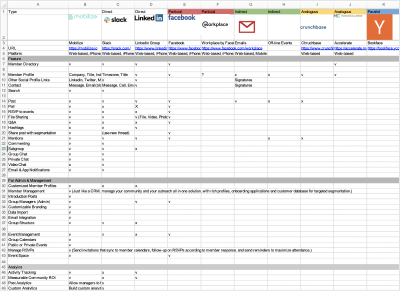
Mobilize vs. Social Platforms
User Personas


Affinity Diagramming
Synthesizing Interview Themes
I used Optimal Workshop Reframer to synthesize participants' experiences, thoughts, and feelings about the alumni program into five themes.

Providing Value to Improve Alumni Engagement
After reviewing the research, I went back to MassChallenge’s business goals. The program relied on connecting startups with partner companies, but many alumni were no longer using the existing platforms after graduation.
I wanted to understand what would make the platform useful enough for founders to return. This helped me focus on the resources and support startups needed as they continued growing.
“There is a gap between the area what we (MassChallenge) called startups and what they call themselves ”
Define
PRIORITIZATION
We used an Impact / Effort Matrix to compare the research findings and discuss priorities with the team.
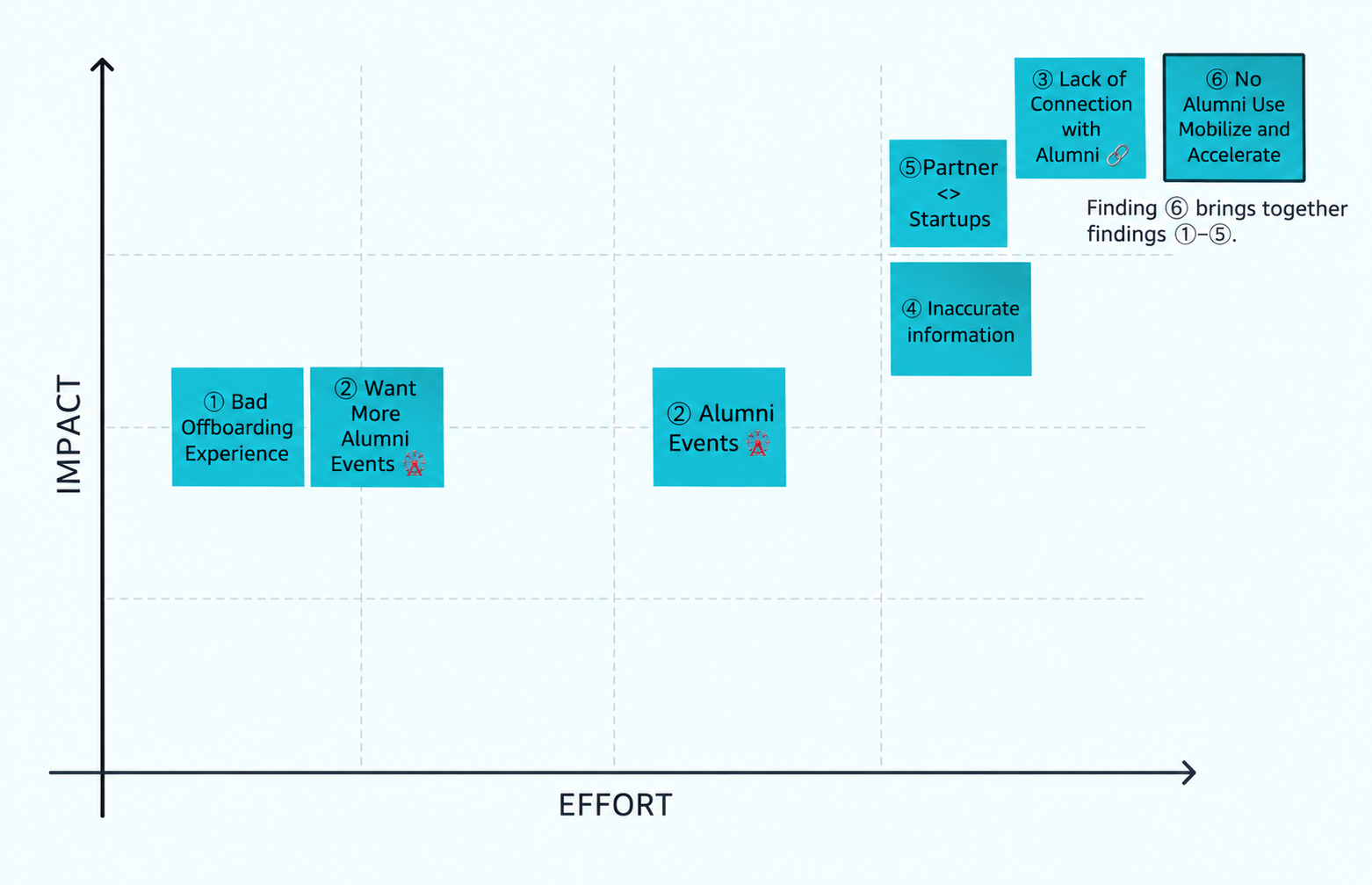
Based on this exercise, we focused the 10-week project on first-time user onboarding.
Re-define the Problem
Defining the Project Scope
MassChallenge's mission guided my design decisions:
“To make it as easy as possible for entrepreneurs to launch and grow new ventures.”
Business Goal
MassChallenge's income relied on providing partner companies with good-quality startups. I kept this relationship in mind when defining the project goal.
Alumni Needs
If founders could not find useful support, they had little reason to stay connected. I considered how their experience during the program could support continued engagement after graduation.
Design Direction
I focused the 10-week project on first-time user onboarding: helping founders set goals and provide up-to-date company information so they could find relevant resources.
Design Ideation
Exploring a Resource-Matching System
Based on the research, I explored a resource-matching concept to help startups find relevant support as their businesses grew.
Brainstorming Session
I worked with a senior designer on a Crazy 8s exercise. We sketched ideas independently, then compared our approaches and discussed which ones could work within the project scope.


Storyboarding
I created a storyboard to explore how the matching system could help entrepreneurs find relevant resources during the accelerator program. I refined it based on feedback from the team and project constraints.

Design Ideation / Jobs to Be Done
As an entrepreneur,
I want to access curated resources, including experts and events, so I can reach my company’s goals.
User Flow
New cohorts completed a 14-page onboarding survey to provide MassChallenge with information about their companies. I explored replacing it with a simpler, step-by-step experience that would be easier to complete.
I mapped two user flows: one for founders joining the program and another for current participants and alumni returning to access resources.
01 /
First-Time Users
- User Goal
- Understand program benefits and set company goals.
- Design Goal
- Simplify onboarding and collect up-to-date company information.
02 /
Recurring Users
- User Goal
- Access relevant resources as their businesses grow.
- Design Goal
- Keep company information updated to support ongoing resource matching.
01 — First-Time Users

Process Details
- Open the resource-matching system from the onboarding email.
- Enter company information, goals, and areas of expertise.
- Find relevant resources, including experts, mentors, office hours, investors, events, and workshops.
02 — Recurring Users

Process Details
- Access the system through staff referrals, emails, event registration, or office Wi-Fi.
- Update company information before accessing resources when needed.
- Keep company details and contact information current as the startup changes direction.
Event registration or office Wi-Fi login could prompt founders to update an outdated profile, helping the system provide more relevant resources.
Iteration
Wireframe
Designing the First-Time Onboarding Experience
I focused on first-time onboarding and used Balsamiq and Figma to explore different ways of collecting startup information and presenting matched resources.

HIGH-FIDELITY EXPLORATION
Exploring the Resource-Matching Experience
Selected screens from my exploration of how startups could share information, set goals, and discover relevant resources.
01
Landing Page
Introducing the resource-matching concept.

02
Goal Setting
Exploring how startups could communicate their goals.
03
Company Specialty
Exploring how startups could describe their expertise.
Validation
Hallway Usability Testing
Testing Early Ideas Through Real Interactions
I conducted informal hallway usability tests with colleagues in the office. I asked them to interact with the wireframes and prototype while I observed how they navigated the experience.
Stakeholder Feedback
Building Alignment Across Teams
I presented the resource-matching concept to stakeholders across program management, data, startup services, and leadership. The discussions received positive feedback and helped build support for the proposed direction.
- Program Manager
- Data Manager
- Startup Services Manager
- Managing Director

Strategic & Organizational Impact
Reconsidering the Platform Strategy
My research surfaced gaps in alumni engagement and resource discovery, helping inform broader discussions about MassChallenge’s platform strategy and where the team should focus its efforts.
Making Resources More Accessible
The organization made these changes to its existing products:
- Opened the startup directory to more startups.
- Provided more relevant dashboard content to users beyond alumni.
Organizational Impact
Retiring Mobilize
~$500K
Estimated Potential Cost Savings
MassChallenge’s leadership decided to retire Mobilize after identifying its low usage. Based on the platform’s budget, the decision represented approximately $500K in potential cost savings.
Next Steps
Future ideas for exploration included:
- A/B testing.
- Gamification to encourage resource exploration.
- Personalization based on startup industry and stage.
